
You search. Velefant finds.
Left the file on your PC? Find it from your phone.
Your files stay on your devices. They don't go to Velefant's cloud.
No automatic charge. Available for iPhone, Android, and Windows.
DEMO
Velefant in 45 seconds
Velefant brand video. Animation with an illustrative depiction of the screens, shown in Portuguese.
HOW IT WORKS
Three steps, and you're set
Install Velefant.
On your computer and on the other devices you want to search, with the same account.
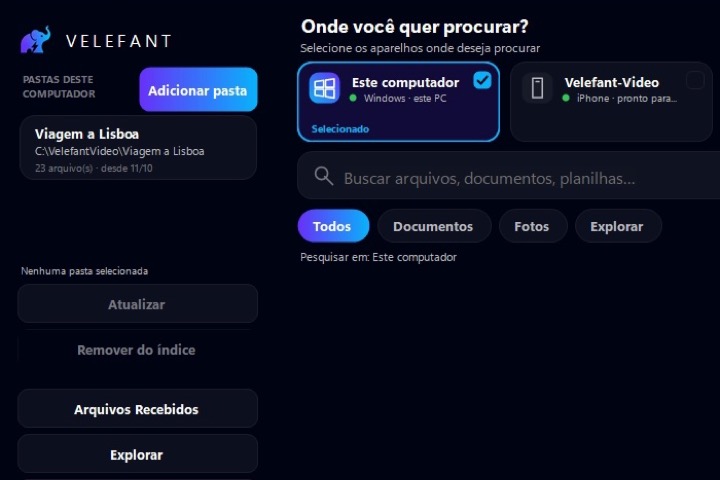
Connect your devices.
You choose the folders included in search and authorize your account's devices one by one.
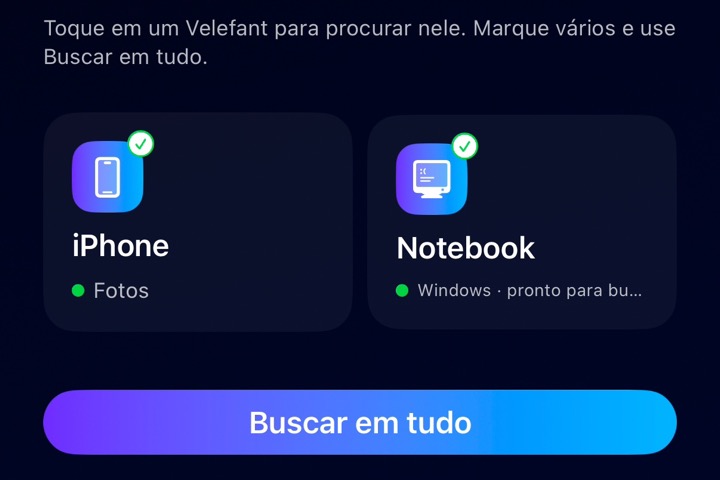
Find your files.
Search by name, by content, or by what appears in the image. A file is only copied when you ask.
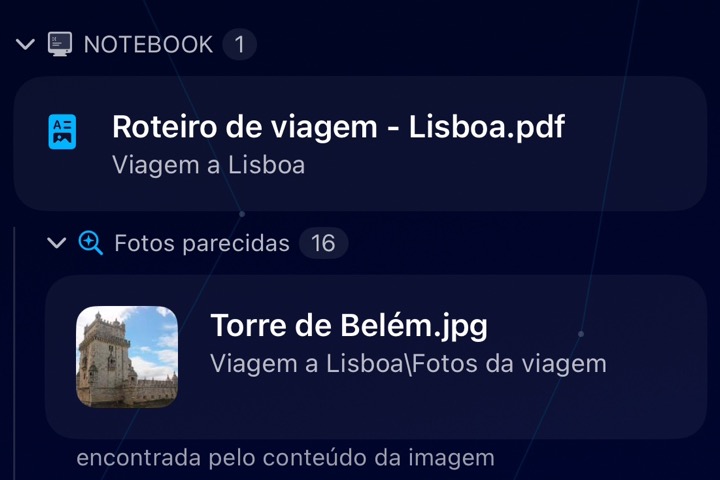
Real Velefant screens, in Portuguese, with sample files.
FEATURES
Made for anyone who has ever wasted time searching
What the Velefant apps for iPhone, Android, and Windows already do.
Search by name and content
Find it by name or by a phrase inside the document: Word, Excel, PowerPoint, OpenDocument, and text.
Inside PDFs
The text of PDFs is included in search, just like any other document.
On iPhone, scanned PDFs too.Text in photos (OCR)
Screenshots, receipts, and photographed documents become searchable text, recognized on the device itself.
On iPhone, Android, and Windows.Visual Search
Search for “beach” or “dog” and find the right photo, even if it has no name. The analysis is done on the device.
The models are downloaded once, with your permission.Search across your devices
From your iPhone, find a file on your Windows computer — and vice versa — on the same network or on different networks.
On the Personal and Pro plans.Send and receive files
Send a file to another one of your devices; it arrives in Received Files, encrypted along the way.
On the Personal and Pro plans.Folders and devices under your control
You choose the folders included in search and authorize, one by one, the devices that can use your account.
Privacy and security
Content exchanged between your devices is end-to-end encrypted, with keys that stay on the devices themselves.
PLATFORMS
iPhone, Android, and Windows
The same features and the same account on all three.
PRIVATE BY DEFAULT
Your files stay where they already are.
Velefant is a search layer, not a storage locker. Your files are not stored on Velefant's servers. For search to work across devices, requests, results, and the index travel encrypted between your own devices, directly or through a relay server, and they aren't stored either. The original file is only copied when you ask.
Files stored on Velefant's servers
Encryption of the content exchanged between your devices
Search for all your authorized sources
PLANS AND PRICING
Pay to connect your devices, not for promises
Start free on one device. To search and copy across your devices, choose Personal or Pro.
Free
1 device
No time limit.
- Search by name and content on this device
- Text in photos and Visual Search
- No credit card
Personal
Up to 3 devices
or R$ 199,90 per year — save 16%
14 days free, no card
- Everything in Free
- Search across your devices
- On-demand copying between your devices
Pro
Up to 10 devices
or R$ 499,90 per year — save 17%
14 days free, no card
- Everything in Personal
- For people with many connected devices
14-day free trial on Personal or Pro, once per account, with no card and no automatic charge. During the trial, the devices and features of the chosen plan apply. Prices in Brazilian reais (BRL).
On the Free plan, text in photos (OCR) works on iPhone, Android, and Windows. See monthly and yearly prices and subscribe.
FREQUENTLY ASKED QUESTIONS
What you need to know
Do my files go to the cloud?
No. Your files remain stored on your own devices, not in Velefant's cloud. When you search for or transfer files between devices, Velefant uses direct connections whenever possible. When necessary, it uses a relay server, keeping the communication protected by encryption.
The index that lets you find your files is also created on your devices. When it's shared between them, it travels encrypted along that same path and isn't stored on Velefant's servers. The servers hold account and service operation data, such as your email, the list and names of your devices, the record of authorizations, and your subscription.
Does my PC need to be on?
To open or copy a file that's on the PC, it needs to be on and connected, with Velefant running. But you can still look up files that have already been cataloged and see which computer they're on, even when it's turned off.
This lookup works for Windows PCs, on plans with cross-device use, and requires the account to have been validated online in the last 30 days. Image search needs the device to be on.
Do I need to enter a card?
No. The 14-day free trial is activated only through the Velefant website, with no card and no automatic charge. You can try the features of the chosen plan during that period. In the iPhone and Android apps, subscriptions follow the terms of the App Store and Google Play, respectively.
Which devices does it work on?
Velefant works on Windows computers, iPhones, and Android phones. You can connect your authorized devices to find and access your files.
Velefant for iPhone is on the App Store, Velefant for Android is on Google Play, and the Windows installer can be downloaded right here on the website.
Does it work on different networks?
Yes. The devices don't need to be on the same network: the PC can be on your home Wi-Fi and your phone on mobile data, as long as both have internet access and are authorized on your account.
What's the difference between the plans?
Free works on 1 device, with local search. Personal, for R$ 19,90 per month or R$ 199,90 per year, covers up to 3 devices. Pro, for R$ 49,90 per month or R$ 499,90 per year, covers up to 10. Both include search and copying across your devices. On the website, subscriptions are handled by Stripe; in the iPhone and Android apps, by the App Store or Google Play.
How do I cancel my subscription?
Whenever you want, through the same channel you subscribed with: on the website, in “My subscription”, option “Manage subscription”; on the App Store or Google Play, in the store's own subscription settings. Access continues until the end of the period already paid, and there's no new charge. Your files and indexes remain on your devices.
The 14-day trial doesn't need to be canceled. It's valid once per account and, if you don't subscribe, the account goes back to Free, with no charge and nothing deleted. If you subscribe during the trial, the trial ends and billing starts the same day.
Is it safe? Who can access my files?
Only the devices you authorize on your account, within the plan's limit. Content exchanged between them is end-to-end encrypted, with keys that stay on the devices themselves. The details are in the Privacy Policy.
Have another question? Contact support. The full rules are in the Terms of Use (in Portuguese) and the Privacy Policy (in Portuguese).
DOWNLOAD
Find what's already yours.
Velefant is now available for iPhone, Android, and Windows.
Still have questions? See the frequently asked questions or contact support.